Elevate Your Golf Game with the Updated Arcis Golf App

Book tee times effortlessly and take your golfing experience to new heights—all from the palm of your hand. We’re pleased to introduce updated features on the Arcis Golf App designed to make your golf journey more enjoyable than ever.
  • Instant Tee Time Reservations: Tap and Book – Day or Night. Book at any Arcis course across the country with just a few taps.
  • On-Course GPS: Navigate the course like a pro. Use our GPS feature to chart your course and perfect every shot.
  • Real-Time Announcements and Notifications: Never miss an update! Get real-time alerts for exclusive offers, events, and more.
  • In App Score Card: The new digital scorecard is an easy and convenient way to keep track of all your birdies!

Frequently Asked Questions

Our answers to commonly asked questions about the new Arcis Golf App

The old App will automatically update on your device using the same icon. You must sign up and create an account on the app, even if you are an existing App user.  

***Important*** If you already have an account to book tee times please use the same email for the App account. If you don’t use the same email it will setup a new account. If you can’t remember your username or password, please use the reset link to receive your username or reset your password.

Download the new app by searching Arcis Golf in either the Apple APP store or the Google Play store.  Once you have downloaded the app you will need to setup your app login information and also create a login to the tee time booking engine. 

The new app provides easy, convenient access to book tee times at any of our courses across the country.  It also have a built in GPS system for on-course play, a scorecard and a section for announcements and information. 

Yes, this is version 1 of the app.  In the near future we will be updating with more functionality and features for both your on-course and off-course enjoyment.

We have several options to help you with the new app.  The staff at each of our courses can assist you in person.  Additionally, you can click the “Can We Help?” button on the left side of this page and send us an email and we will contact you.  Or you can CLICK HERE and submit a form for assistance and a member of our team will assist you.  

New Arcis Golf App

+

Step by Step Instructions

#1

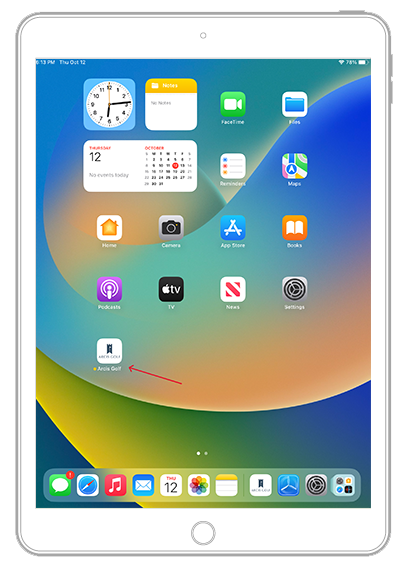
Locate the Arcis App on Your Home Screen.

#2

IMPORTANT

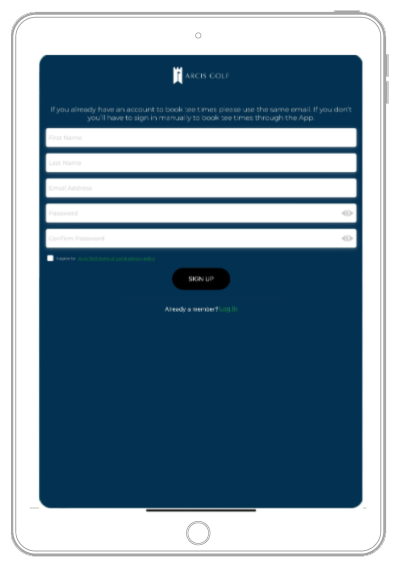
You must sign up and create an account on the app, even if you are an existing app user.

#3

Create Your Account

#4

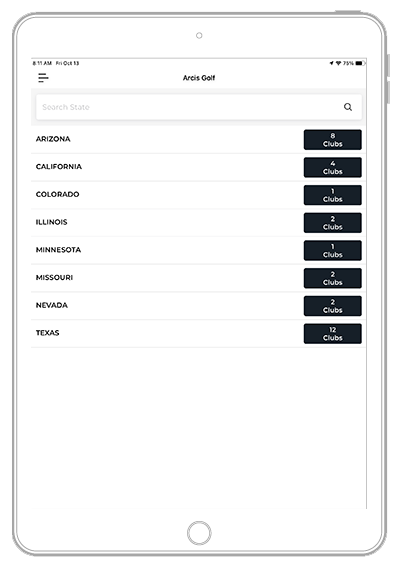
Once you are logged in you will see all of the Arcis Courses arranged by Region.

#5

Just select the course you wish to book your reservation at by clicking Reserve Tee Time. You will automatically be logged into the booking engine.

#6

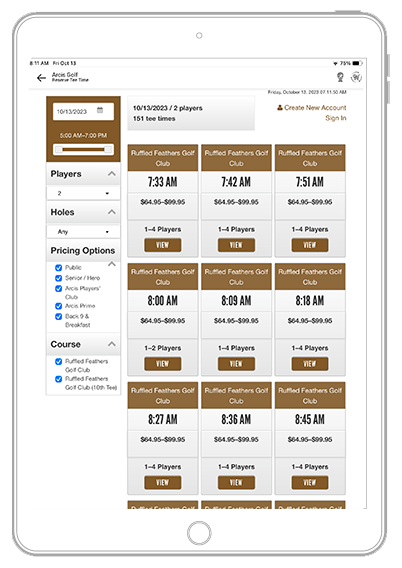
View all available tee times

If you are an Arcis Players' Club or Prime Member you will see those options as well.

#7

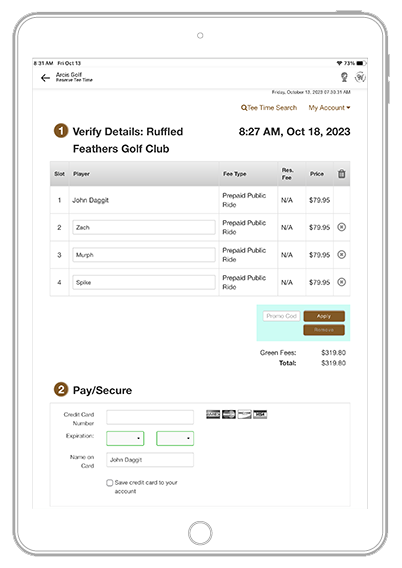
Now that you are logged in you can select and book your tee time

#8

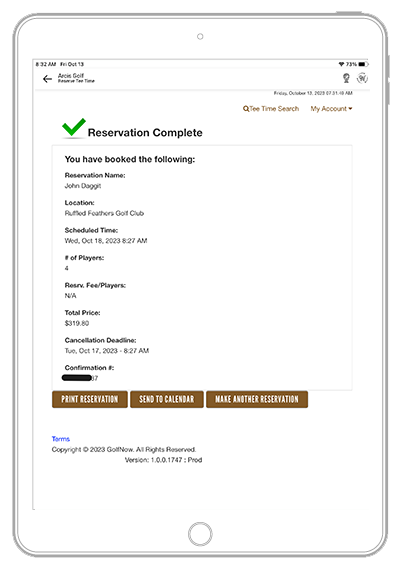
Review your booking
If all is correct, click finish reservation

can't find what you're
looking for?
Scroll to Top

Please complete the form for assistance

Please click the submit button to continue